Now on the App Store

Place tattoos you already have on your own 3D body. Then see where new designs fit.

Download on the App Store

Free, for iPhone. No account needed. Use it in your browser on Android or desktop. Android app coming soon.

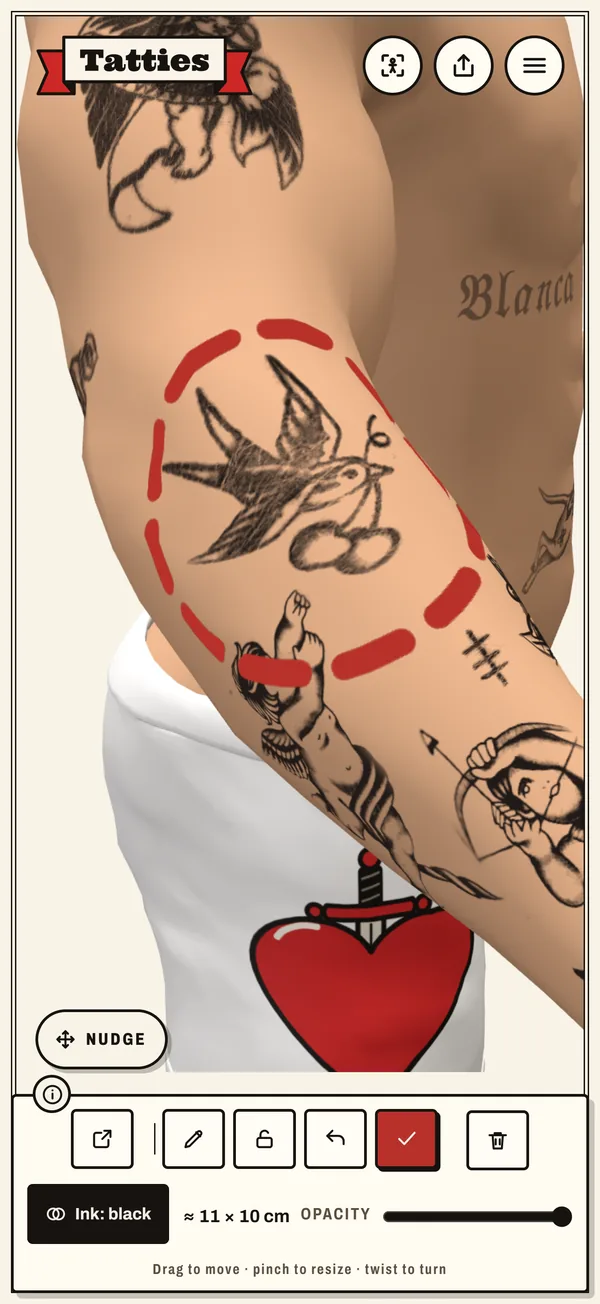
The Tatties app: a swallow tattoo being placed on the arm of a 3D body

How Tatties works

  1. 01

    Wishlist

    Save the designs you keep coming back to.

  2. 02

    Canvas

    Try them on a 3D body you can turn around.

  3. 03

    Tattoo

    Once it's real, log the artist, the studio and the sitting.

  4. 04

    Collection

    Every piece you own, in one private place.

A tattoo tracker and tattoo planner in one

Keep every tattoo you have on a body that looks like yours, and try the next one before you book.

Cut it from any photo

Take a photo of a tattoo, tap Find tattoo or trace it with your finger, and it lands on your 3D body. No AI service, all on your phone.

Try designs before you book

Put a design on your own 3D body and turn it around. See how it sits on your forearm, back or calf, how big it can go, and how it looks next to the tattoos you already have. Then show your artist.

Your whole tattoo collection

Log the artist, studio, style, date, price and hours in the chair for every piece, with sessions and touch-ups. On iPhone, a daily aftercare reminder while a new tattoo heals.

Private by design

No body scan: you set your height, weight and build yourself. No account needed, and your photos stay on your phone unless you switch on sync.

Yours on every device

Turn on optional sync with a free account and your collection, photos included, follows you to a new phone. Local-first stays the default.

On Android?

The Android app is coming to Google Play. Leave your email and we'll let you know when it's there.

We only use your email for this and delete it once the app is out. Privacy

Questions

What is Tatties?

Tatties is a tattoo tracker and tattoo planner. You build a 3D body that looks like you, put the tattoos you already have on it, and try new designs to see where they fit before you book.

Is Tatties free?

Yes. Tatties is free on the App Store, without ads, and keeping your collection always stays free. If paid extras are added later, Founders (the first 100 accounts) keep every feature for free.

Do I need an account?

No. Everything works without an account and your photos stay on your phone. An account is only for syncing your collection between devices. You can sign in with Apple, Google or email.

How do I get my tattoo onto the 3D body?

Take or pick a photo, tap Find tattoo or trace it with your finger, then place it on the body. It wraps around arms and legs, and you move, turn and resize it with two fingers.

Can I try a tattoo before I get it?

Yes. Add a design to your wishlist and put it on the model to check the size and placement. Share a picture or a spinning video with your artist.

Is Tatties on Android?

Not yet: the Android app is coming to Google Play. Leave your email and we'll let you know when it's there. Until then you can use Tatties in your browser. Open the web version.

Is Tatties available in Dutch?

Yes. Tatties is in English and Dutch. You pick the language on the welcome screen or later in Settings.

Can I suggest a feature?

Yes, please. Tell us which features you'd like to see next: tap Send feedback in the app (in Settings or the menu in the 3D view), email hello@tatties.app, or message us on TikTok or Instagram. We read every message.

Are my photos private?

By default everything stays on your device. If you switch on sync, your collection is stored on servers in the EU, and you can delete your account and all your data at any time in the app.